


Der 3D PGG Rotationsdrucker
Contents
1 Introduction
2 The new printing concept and its advantages
3 Features of the PGG 3-D rotation printer
4 The Prototypes
4.1 First prototype: printer made of wood and metal
4.2 Second prototype: the printed printer
5 Software
5.1 A new software package for the 3-D rotation printer
5.2 The rotation slicer
5.3 Control program
5.4 Firmware
5.5 Software development
6 Printing examples
7 Acknowledgements
-------------------------------------------------------------------------------
Introduction
“3-D printer” is a word that is now taking over those media that continuously focus on the documentation of new technologies. However, it is not about the idea itself that has already been applied in very expensive processes in the field of prototyping for a long time. It is rather about the development of technologies that make this process applicable on various materials. Apart from plastics, metals and the raw material of ceramics can also be used for printing. Moreover, the created structures even pave the way to new fields of technology. For example, printed micro structures to which human cells can adhere to can make reproduction of body parts possible in medicine.
Furthermore are possible:
- Creation of new, light structures for aircraft construction (also similar to bone structures in nature)
- Saving of storage and material costs for guarantees services
- Saving of transportation costs as products can be produced locally, even at home
- A social innovation revolution as more people are able to realise their own creativity potential
The last point is possible due to the application of cheap melting processes for plastics. Thus, 3-D printing becomes more and more affordable to private users. Besides, the use of biodegradable plastics and recycling strategies increases the environmental friendliness of 3-D printing. Currently, constructions kits are available on the Internet that are based on open source projects. According to own experiences, however, 3-D Printing requires patience and technical skills. For this reason, 3-D printers have not reached the same level of easy handling yet as 2-D printers.
Thus, this document is the result of a very elaborate series of attempts that were shaped by failures and successes. The knowledge we gained during our project makes up a wealth of experience that helps us to overcome further difficulties.
Great inventions have often been small ideas at first. Not rarely, Sci-Fi authors provide the encouragement for innovations. Thus, the TV series “Star Trek” probably did not only inspire the inventors of the mobile phone and automatic sliding doors. People familiar with the series should also recognize similarities with 3-D Printing when it comes to the word “replicator”. Programmed objects can be replicated by a machine – the replicator – as requested. In this way, the replicator is even able to replicate itself. Although self-replicating is still a long way off, the idea encouraged us to produce as many components of our second prototype using a usual 3-D printer.
In order to start a project that does not just include procedures and constructions that are already known, we analysed, what kind of weaknesses the cheapest printing process – extruding plastic on a flat surface – might have.
It is easy to recognize that this printing process becomes more expensive when cavities or bridges need additional support material for printing. Thus, additional costs occur as the support material has to be removed mechanically. For this reason, the material is wasted. If water soluble substances are used, additional costs will also be caused by the required use at least two printing heads.
Our concept – the rotation printer – can avoid support material for many structures, because objects are printed on a rotating cylinder instead of a plane table here. So our concept distinguishes itself from other open source projects and complements them. In the course of our work, it was necessary to modify several process principles and to develop a completely new software package. Both of these aspects are presented in this document.
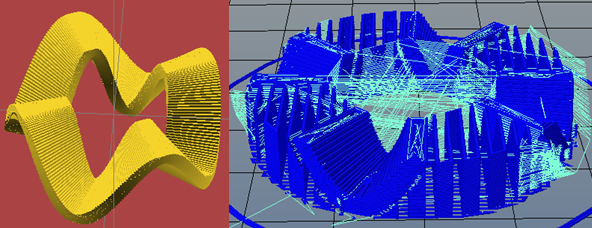
This object requires support material on a usual flat bed printer
The new printing concept and its advantages
Before purchasing our own printer, we had already started to develop a prototype with components that were not produced by a 3-D printer.
In December 2013, we were provided with a construction kit of the Velleman K8200 3-D printer. We instantly began to build the printer. Thus, we were able to gain some first experiences with this usual XYZ flatbed printer. Therefore, we could add another prototype to our project. We designed as many components of this second prototype as possible on the PC and prepared them for being printed by the K8200. As a result, there were two approaches to our concept we worked on in parallel. Furthermore, the experiences with the flatbed printer helped us to make some significant simplifications compared to the flatbed printer. Thus, we did not implement mechanical end stops and a heated printing surface.
Features of the PGG 3-D rotation printer
The rotation printer is similar to a lathe. Any objects that have radial self supporting structures should have advantages in production.
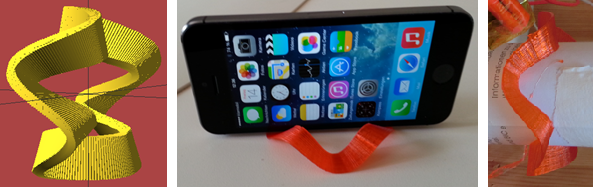
The object presented in the introduction doesn’t need any support material on a rotational printer
There are some objects that need a considerable amount of support material regardless of the position of the object on the printer table (see example in the introduction). However, the support material leads to additional costs and printing duration and involves the risk of damaging the object when trying to detach it from the object. For this reason, support material should be avoided as far as possible. If those objects are considered with regard to the support from a central axis, a lot of them will require significantly less support material or no support material at all.
There are some more advantages as far as rotation printing is concerned. For example, if you want to print a head with a usual printer, it will be necessary to cut the head vertically into two pieces. Then the cut surfaces are placed on the printer table. Afterwards, both components have to be sticked together with glue. However, this involves the risk that a visible gap will remain or that both parts will be inaccurately connected to one another.In rotation printing, the head can be printed seamlessly around the axis. The remaining hole in the neck is unimportant, whereas the upper hole could be covered by the head's hair. Furthermore, we could consider using a printing axis with a conical end that would not leave a hole.
Another advantage of rotation printing is that you can avoid the use of a heated printing surface that would cause the object to flake off the printing surface of a usual printer due to thermal tensions. Paper is a suitable printing ground as it can be easily removed from the object afterwards leaving no remains. However, fixing paper on the printing table of usual printers would be very difficult as it would have to be attached with glue. This way, it could no longer be removed. In contrast to that, paper can be attached more easily to the rotation printer's cylinder.
The prototypes
First prototype: Printer made of wood and metal
As no 3-D printed components should be used for the development of the first prototype, all parts of the metal frame as well as the fastening have to be made of products that are affordable and easily accessible. For this reason, we used aluminium profiles for the frame components and wood or angle irons for the fastenings.
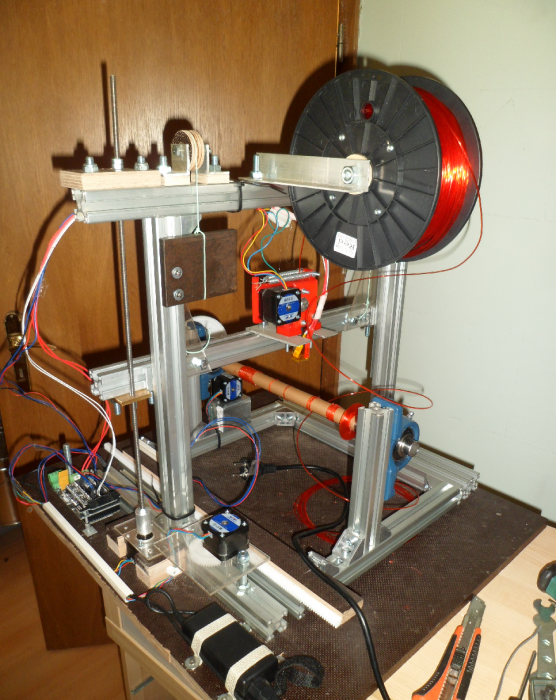
The printer made of wood and metal
Second prototype: the printed printer
If a printer is already available or if a producer for a cheap construction kit can be found, this minimalist prototype has an advantage. Support components, cog wheels, mountings and even the extruder were designed on the PC here. We used the program OpenSCAD to design the components. All in all, less than one role of filament (1 kg) is required for the production of one construction kit. Additionally, three drawer linear bearings and two shelf angels are part of the support construction. Of course bolts for fastenings and threaded rods as an axis are needed. Furthermore, we used small cheap ball bearings for roller blades.
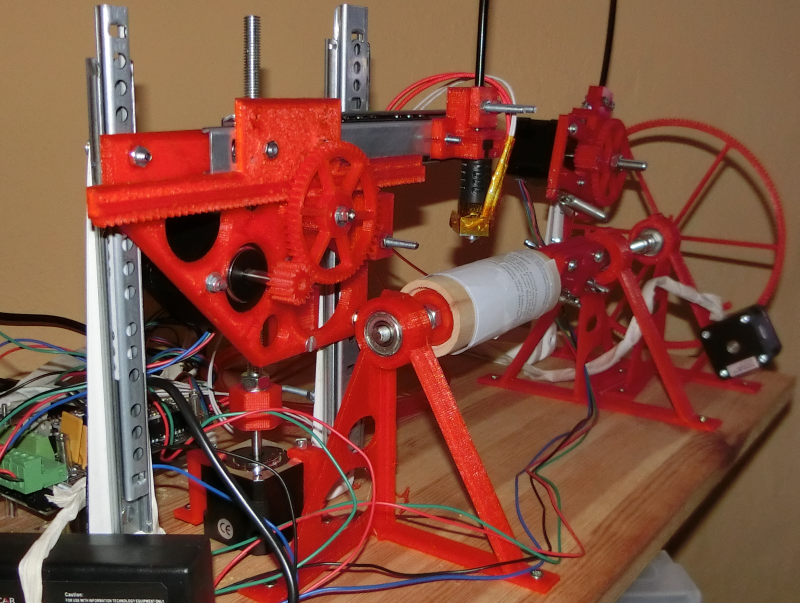
The printed printer
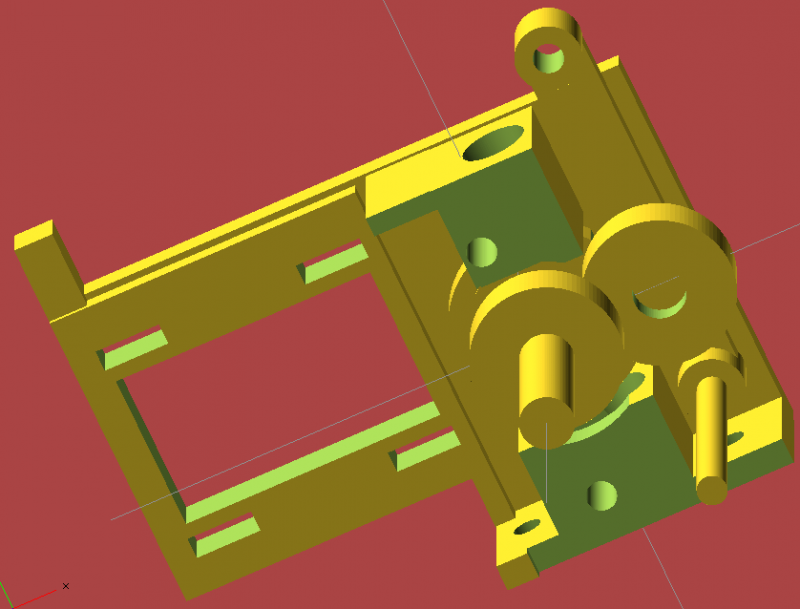
The interior of the extruder
Software
A new software package for the 3-D rotation printer
If you want to learn something, it is the best to start from scratch. We had to start from scratch not entirely voluntarily as the adaption of the existing Marlin firmware proved to be impossible. In addition to the full-grown engineering- and design project as well as a currently suspended programming project for adapting existing software , we intended to start a new and extensive programming project that would have to provide all features of the existing software anew. The basis, i.e. electronic printer components, comprises an Arduino 2560, an add-on board called RAMPS 1.4, stepper motors and a hotend with a temperature sensor. We decided to not use end stops, as they turned out to be troublesome , according to experiences with the flat bed printer. Furthermore the heated printing table was abandoned. Both the firmware and the control software were developed simultaneously with Lazarus . Lazarus is suitable for Windows and Linux systems, which is why the project maintains its cross-platform capability. In the following paragraphs the software components are presented in the sequence of their development.
The rotation slicer
First of all, the program creates a complete sectional plane of the object according to the principle of FDM. Then the printing head is moved upwards in z-direction layer by layer.
In contrast to to bed printers, here the layers are not planes but cylinders. Since the adaption of existing software was abandoned, the first printings depended on manually created g-code. That is possible for specific “calculable” objects but not in general. More complex objects are preferably implemented as STL files, describing an object as a set of triangles. They require a program that generates a g-code list according to a 3-D file.
The software performs several steps:
- Slicing the object into thin layers
- Defining perimeter lines that make up the object’s envelope
- Defining lines, filling the object (infill) and forming an inner support structure
The filling structure has a rigid and rectangular pattern. The radial lines keep a constant distance to each other. With the increasing radius, however, the distance of the axial lines also increases and thus the stability decreases and the pillars get branched. Now, the perimeter lines as well as the lines of the filling structure have to be arranged to make sure that the connecting paths are as short as possible.
For reviewing and simulating a g-code interpreter, showing g-code in a 3-D view, was developed.
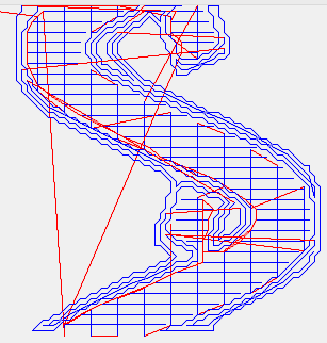
G-code for a single radius-blue: printed lines; red: unprinted lines
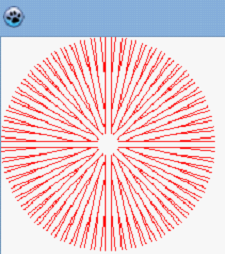
Filling structure
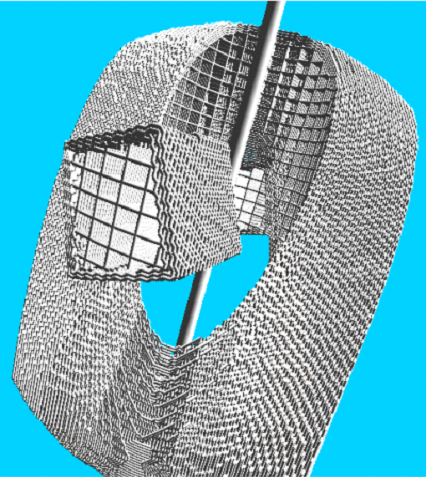
Simulated g-code; center: reduced axis
Control program
The transmission of the g-code commands is performed by a control software that is written in Lazarus. Directly after establishing a serial link, the software starts displaying status information. For example the temperature is presented clearly in a timing diagram.
Basic commands such as moving the axes individually can be given via a control panel.
However, the actual task of the program is the safe and regulated transmission of the g-code commands. For example, therefore it is necessary to check whether the printer received a command correctly and to check the command “fill level”.
Furthermore the 3-D g-code can be previewed here to check the position and measurements regarding the axis.
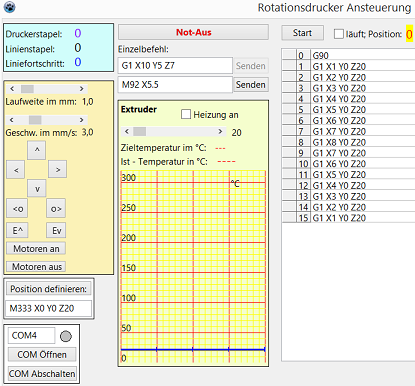
User interface of the control program-center: temperature/time diagram;
left: manual control panel; right: g-code;
top lefthand corner:fill state information of the printers command memory
Firmware
The firmware on the microchip receives and interprets the commands, calculates necessary motor steps as well as output changes for the heater and in turn communicates with the host program. Popular programming environments are the powerful BASCOM and the very simple Arduino editor for C, which we used.
Software development
The complex mathematical algorithms were been developed completely from scratch, including all vector calculations, the adapted contour tracing algorithm, the algorithms for searching and arranging as well as the g-code interpreter.
Similar to using Pascal for programming (in Lazarus), we also implemented a cross-plattform solution (e.g. for Windows and Linux) by using OpenGL for the 3-D visualization.
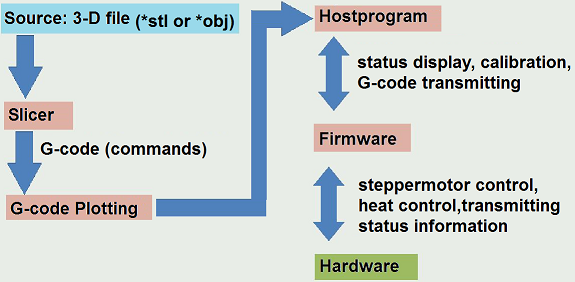
Printing examples
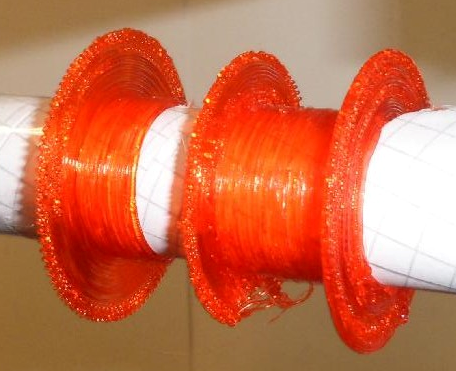
Repair-patch-spool, 60 G-code lines
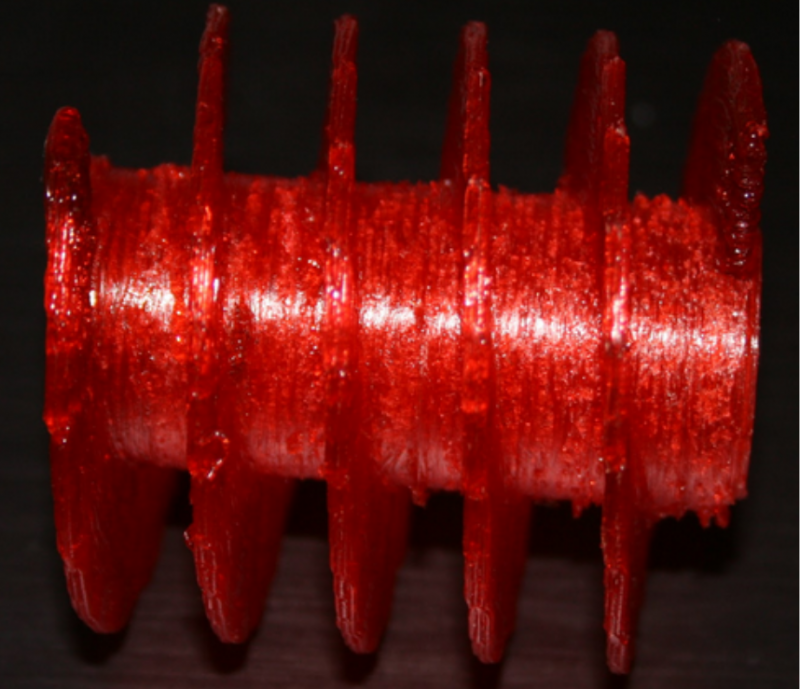
Archimedean screw, 2200 G-code lines
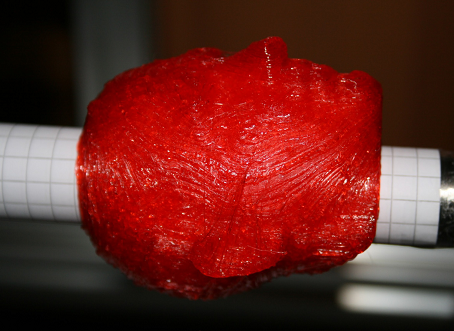
Head, 80000 G-code lines
Acknowledgements
We want to thank everyone who has supported and helped us in any way. We especially thank our teacher Mr. Freddy Stiehler as well as our parents that have supported us mentally. Furthermore we owe to our predecessors that paved the way for youth science at our school.